How Do MCP Registries Work (Smithery, mcpt)?
There are thousands of MCP servers available. Finding the right one, evaluating whether it’s trustworthy, and installing it correctly — that’s where registries come in.
Here’s how MCP registries work, which ones matter, and how to use them effectively.
The Short Answer
MCP registries are directories of MCP servers — searchable, categorized, and installable. They solve the discovery problem: “Which MCP server does X, and how do I install it?”
| Registry | Size | Strength | Best For |
|---|---|---|---|
| Smithery | Largest (5,000+) | Breadth, install commands, reviews | Finding any MCP server |
| mcpt | Curated (500+) | Quality focus, CLI tool, auto-updates | Reliable production servers |
| OpenTools | Growing (1,000+) | Search, categories | Alternative discovery |
| npm | Everything | Raw package access | Developers building custom setups |
How Discovery Works
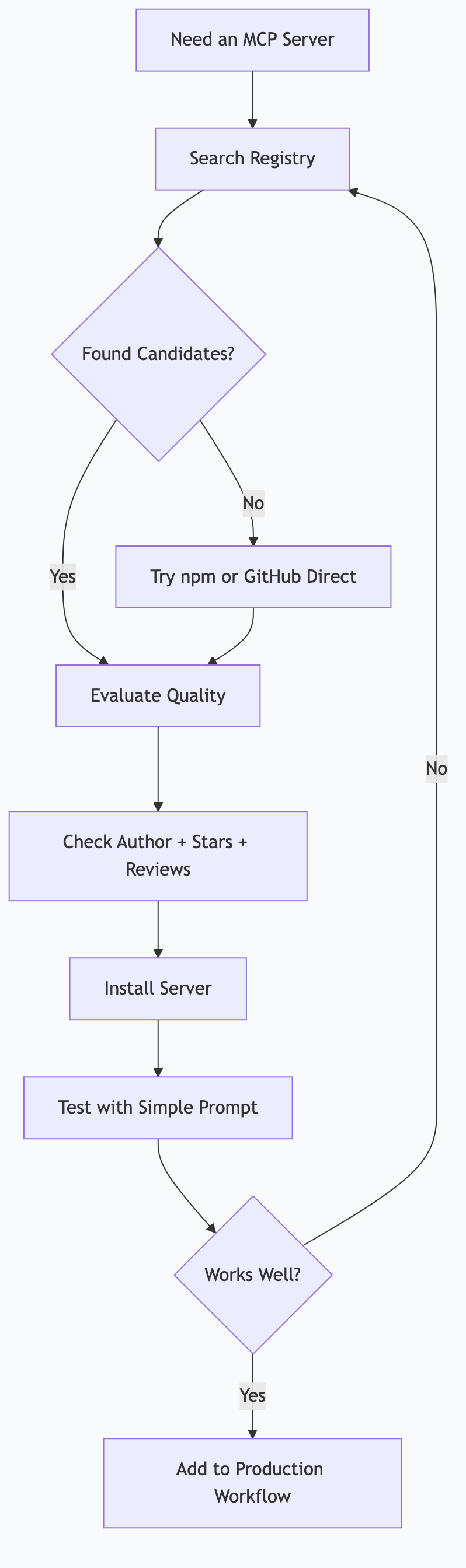
The Problem Registries Solve
Without registries, finding an MCP server means:
- Searching GitHub for “mcp-server-[thing you want]”
- Hoping the README has install instructions
- Guessing if it’s maintained, secure, and compatible
- Manually configuring everything
With registries:
- Search or browse by category
- Read description, reviews, and install command
- Copy-paste the command
- Done
Search Patterns
Most registries support these discovery methods:
Category browsing: Productivity, Development, Data, Communication, Creative, Business
Keyword search: “gmail”, “database”, “web scraping”, “calendar”
Tag filtering: “official”, “verified”, “popular”, “new”
Sort options: Most installed, highest rated, recently updated
Smithery: The Largest Registry
Smithery is the de facto standard for MCP server discovery. Here’s how to use it effectively.
Browsing Smithery
Visit smithery.ai and you’ll see:
- Featured servers — editorially curated highlights
- Categories — organized by use case
- Search — keyword search across all servers
- Trending — most popular servers this week
Reading a Server Listing
Each server page shows:
| Section | What It Tells You |
|---|---|
| Description | What the server does and its capabilities |
| Tools | Specific tools the server exposes (e.g., list_events, create_event) |
| Install command | Copy-paste for Claude Desktop or Claude Code |
| Configuration | Required API keys or settings |
| Author | Who built it — official orgs vs. community |
| Stats | Install count, last updated, GitHub stars |
| Reviews | User feedback on reliability and quality |
Installing from Smithery
For Claude Desktop: Smithery provides the exact JSON block to add to your config file:
{
  "mcpServers": {
    "server-name": {
      "command": "npx",
      "args": ["-y", "@scope/mcp-server-name"],
      "env": {
        "API_KEY": "your-key"
      }
    }
  }
}
Copy it, paste it into claude_desktop_config.json, add your API key, restart Claude.
For Claude Code: Smithery often shows the CLI command:
claude mcp add server-name -- npx -y @scope/mcp-server-nameEvaluating Quality on Smithery
Not all servers are equal. Here’s how to assess quality:
| Signal | Good Sign | Warning Sign |
|---|---|---|
| Author | Official org or verified developer | Anonymous, no GitHub link |
| Last updated | Within the past 3 months | Over 6 months ago |
| Install count | Hundreds or thousands | Single digits |
| GitHub stars | Active community | No repository linked |
| Reviews | Specific positive feedback | No reviews or vague complaints |
| Tools listed | Clear, well-documented tools | Vague or missing tool descriptions |
mcpt: The Curated Alternative
mcpt takes a quality-first approach. Fewer servers, but higher average reliability.
The mcpt CLI
mcpt provides a command-line tool for managing MCP servers:
# Install the CLI
npm install -g mcpt

# Search for servers
mcpt search calendar

# Install a server
mcpt install google-calendar

# List installed servers
mcpt list

# Update all servers
mcpt update
Advantages of mcpt
| Feature | Smithery | mcpt |
|---|---|---|
| Curation | Community-driven | Editorially reviewed |
| Install method | Manual config editing | CLI tool handles everything |
| Updates | Manual | mcpt update handles all |
| Quality bar | Low (anyone can list) | Higher (review process) |
| Size | Largest selection | Smaller, more reliable |
When to Use mcpt vs. Smithery
- Use Smithery when you need a server for an obscure tool or want maximum choice
- Use mcpt when you want reliable, well-maintained servers with easy management
OpenTools and Other Registries
OpenTools
OpenTools is a growing registry with a clean search interface. It focuses on categorization and discoverability. Worth checking if you don’t find what you need on Smithery.
npm Direct
Every Node.js-based MCP server is published to npm. You can search npm directly:
npm search mcp-serverThis gives you access to everything, including servers not yet listed on any registry. But there’s no curation, reviews, or quality signals — you’re on your own to evaluate.
GitHub
Many MCP servers live on GitHub before they’re registered anywhere. Search GitHub for:
mcp-server(general)modelcontextprotocol(official repos)mcp-server-[tool-name](specific tools)
GitHub gives you access to source code, issues, commit history, and contributor activity — the deepest quality signals available.
Security Considerations
MCP servers run code on your machine. Take security seriously.
Before Installing Any Server
- Check the source. Is the GitHub repo linked? Can you see the code?
- Check the author. Is it an organization you recognize? A developer with a history?
- Read the permissions. What tools does it expose? What data can it access?
- Check for credentials. Does it need API keys? Where does it send data?
- Check freshness. When was it last updated? Are dependencies current?
Red Flags
| Red Flag | Risk |
|---|---|
| No source code available | Can’t verify what the code does |
| Requests unusual permissions | May access more than needed |
| No clear author or organization | Harder to trust, no accountability |
| Hasn’t been updated in 12+ months | May have unpatched vulnerabilities |
| Very few installs, no reviews | Unvalidated by the community |
Best Practices
- Start with official servers from Anthropic, Google, Microsoft, and established organizations
- Read the code if you’re installing a community server that handles sensitive data
- Scope permissions — only give file system access to directories you actually need
- Monitor behavior — check logs if a server seems to be making unexpected network calls
How I Actually Do This
I use a mix of Smithery, npm, and direct GitHub sources for my MCP server setup.
My Discovery Workflow
- Need a server → Search Smithery first (broadest selection)
- Found candidates → Check GitHub repo for each (code quality, maintenance)
- Evaluate → Look at install count, last update, and whether tools match my needs
- Test → Install and test with a simple prompt before adding to automation
- Production → Only servers that pass testing go into my daily workflow
Building for Registries
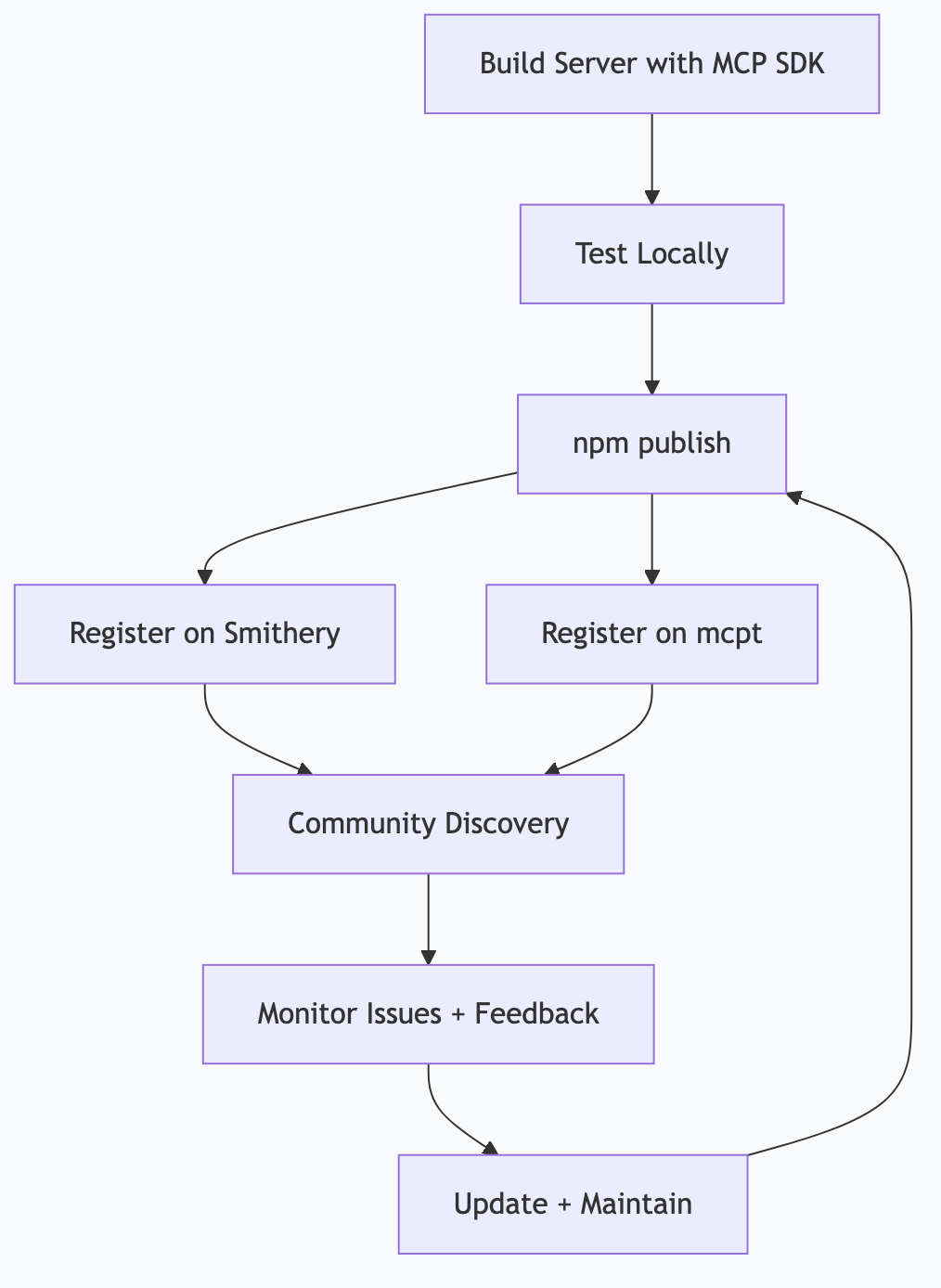
I’m building mcp-astgl-knowledge — an MCP server that exposes all 20 articles in this series as searchable knowledge. The plan:
- Build with TypeScript and the
@modelcontextprotocol/sdk - Publish to npm (
npm publish) - Register on Smithery (submit listing with description, tools, install command)
- Register on mcpt (submit for review)
- Maintain — update when new articles are added, respond to issues
This will be a real example of the full lifecycle: build → publish → register → maintain. I’ll update this article with the actual experience once it’s done.
What I’ve Learned
-
Smithery is the starting point for everyone. It has the most servers and the most familiar interface. Start there.
-
mcpt’s CLI is underrated. Managing updates across 15 servers manually is tedious.
mcpt updatehandles it. -
Official servers are worth the premium. Anthropic’s official MCP servers for filesystem, web search, and databases are rock-solid. Community servers vary widely in quality.
-
Read the tools list carefully. A “Gmail MCP server” might only support reading emails, not sending them. The tools list tells you exactly what’s possible.
-
The ecosystem is young and growing fast. New servers appear daily. Check registries monthly — the server you wished existed last month might exist now.
Publishing Your Own MCP Server
If you’ve built something useful, publishing it helps the community and builds your reputation.
The Publishing Process
- Build your server using the MCP SDK
- Test it locally with Claude Desktop or Claude Code
- Publish the npm package:
npm publish - Register on Smithery: Submit your listing with description, install command, and documentation
- Register on mcpt: Submit for editorial review
- Maintain: Respond to issues, update dependencies, improve based on feedback
What Makes a Good MCP Server Listing
| Element | Why It Matters |
|---|---|
| Clear description | Users need to know what it does in 2 sentences |
| Tool documentation | Every tool should have a name, description, and example |
| Install command | Copy-paste ready for Claude Desktop and Claude Code |
| Configuration guide | What API keys or settings are needed |
| Source code link | Transparency builds trust |
| Changelog | Shows the server is actively maintained |
Frequently Asked Questions
Are MCP registries safe?
Registries are directories, not security guarantees. They make discovery easier but don’t audit every server’s code. Treat registry listings like npm packages — check the source, author, and community signals before installing. Official and popular servers are generally safe. Obscure, unreviewed servers deserve more scrutiny.
Can I use MCP servers not listed on any registry?
Yes. Any MCP server can be installed manually by pointing your config to the npm package or local path. Registries are for discovery — they’re not gatekeepers. You can even build private MCP servers that never appear on any registry.
How often should I update my MCP servers?
Monthly is a good cadence. Security patches, bug fixes, and new features arrive regularly. If you use mcpt, mcpt update handles everything. For manual installs via npx, you always get the latest version automatically.
Will there be one dominant MCP registry?
Probably not — the ecosystem benefits from multiple registries with different strengths. Smithery for breadth, mcpt for quality, npm for raw access. This mirrors how package managers work: npm, GitHub, and specialized registries coexist.
Can I run my own private MCP registry?
Yes, for organizations that want to share internal MCP servers. The MCP protocol doesn’t require public registries — any discoverable endpoint works. Some companies run internal registries for proprietary servers that access internal systems.
This is part of the ASTGL Definitive Answers series — structured, practical answers to the questions people actually ask about AI automation, MCP servers, and local AI infrastructure.
Related Articles
Get the full Definitive Answers series
Practical answers to the questions people actually ask about AI automation, MCP servers, and local AI infrastructure.
Subscribe on Substack