How Do I Automate Workflows with AI Agents?
Article 13 in this series introduced what AI agents are. This article goes deeper: how to design, build, and operate agent workflows that handle real work — from simple scheduled tasks to multi-agent orchestration.
If you’ve already automated a few tasks and want to level up, this is your guide.
The Short Answer
Agent workflows combine AI reasoning with tool access and scheduling to complete multi-step tasks autonomously. The architecture ranges from simple (one agent, one task) to complex (multiple agents coordinating on a pipeline).
| Complexity | Architecture | Example |
|---|---|---|
| Simple | One agent, one task, scheduled | Morning briefing at 6:30 AM |
| Chained | Multiple steps, sequential | Research → Draft → Edit → Publish |
| Parallel | Multiple agents, simultaneous | 5 news sources searched concurrently |
| Orchestrated | Coordinator + specialist agents | Content council with 5 roles |
Workflow Patterns

Pattern 1: Scheduled Single-Agent
The simplest useful workflow. One agent runs one task on a schedule.
[Schedule] → [Agent + Tools] → [Output + Delivery]Example: Daily security audit
- Schedule: Saturday 8:00 AM
- Agent: Gemma 4 31B with filesystem MCP
- Task: Read all config files, check for common misconfigurations, compare against best practices
- Output: Audit report delivered to Discord
When to use: Any standalone task that repeats on a schedule and benefits from AI reasoning.
Pattern 2: Sequential Chain
Multiple steps execute in order, each feeding into the next.
[Step 1: Research] → [Step 2: Draft] → [Step 3: Edit] → [Step 4: Publish]Example: Content creation pipeline
- Step 1: SCOUT agent searches for trending topics, produces research brief
- Step 2: QUILL agent writes article from research brief
- Step 3: LEDGER agent fact-checks article against sources
- Step 4: MAVEN agent generates distribution pieces
When to use: Tasks with natural stages where each stage’s output becomes the next stage’s input.
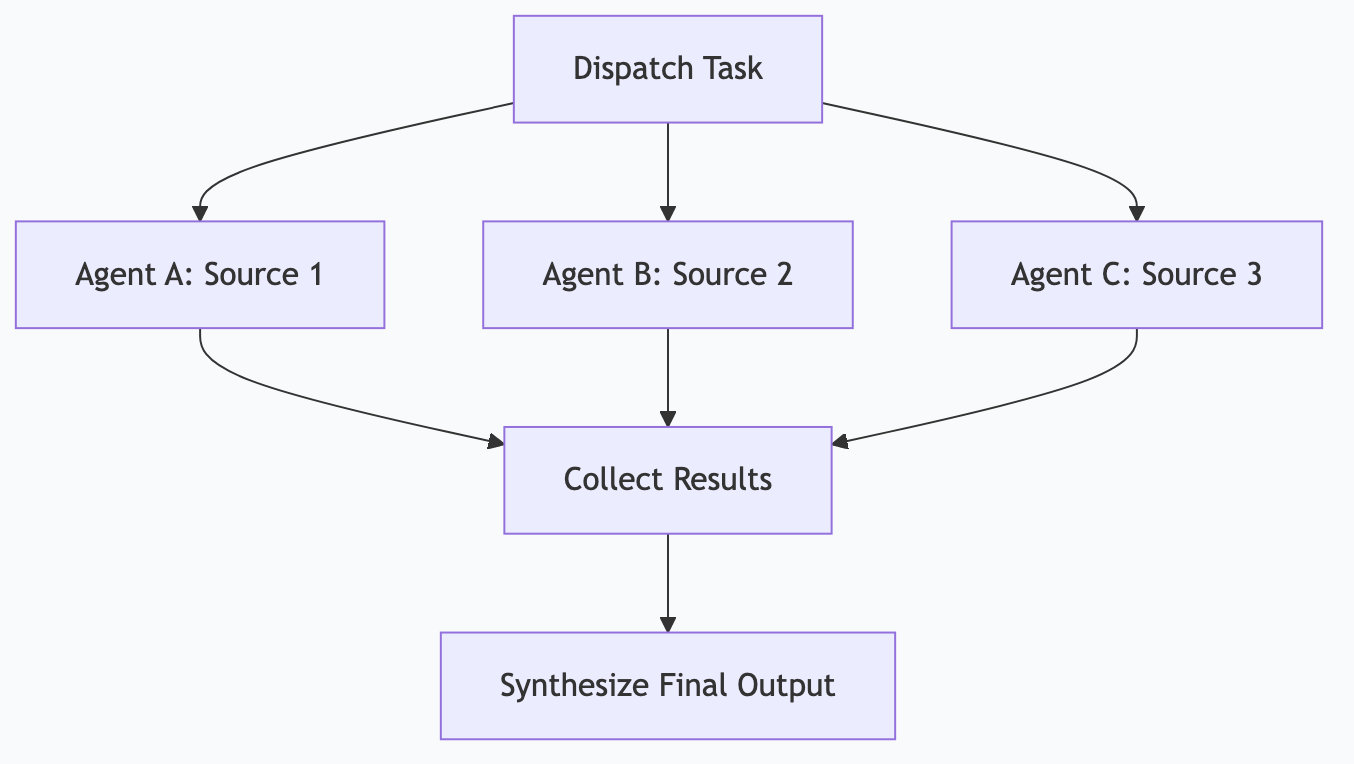
Pattern 3: Fan-Out / Fan-In
One task spawns multiple parallel tasks, results are collected and synthesized.
            → [Agent A: Source 1] →
[Dispatch] → [Agent B: Source 2] → [Collect + Synthesize]
            → [Agent C: Source 3] →
Example: Competitive research
- Dispatch: “Research these 5 competitors”
- 5 parallel agents each research one competitor
- Collector synthesizes all 5 reports into a single competitive brief
When to use: Tasks that can be decomposed into independent subtasks, where parallelism saves time.
Pattern 4: Router + Specialists
A lightweight router examines each incoming task and dispatches it to the best specialist.
[Input] → [Router] → [Specialist A (code)]
                   → [Specialist B (writing)]
                   → [Specialist C (research)]
                   → [Specialist D (triage)]
Example: Notification processing
- Router: Gemma 4 e4B classifies incoming notifications (fast, cheap)
- Critical → Immediate Discord alert
- Important → Queue for hourly batch
- Routine → Queue for 3-hour digest
- Spam → Discard and log
When to use: High-volume inputs that need different handling based on content or urgency.
Pattern 5: Multi-Agent Council
Multiple specialized agents collaborate on a complex task, each contributing their expertise.
[SCOUT] → findings → [FORGE] → outline → [QUILL] → draft → [LEDGER] → verified → [MAVEN] → published
                                                         ↑                              |
                                                         └──── revision request ────────┘
Example: Content production council (my actual setup)
- SCOUT: Research and topic discovery
- FORGE: Structure and outlining
- QUILL: Drafting with voice profile
- LEDGER: Fact-checking and validation
- MAVEN: SEO, distribution, and publishing
Agents can request revisions from earlier agents — LEDGER can send a draft back to QUILL if facts don’t check out.
When to use: Complex, multi-faceted work where specialized expertise improves quality.
Building a Workflow: Step by Step
Let’s build a real workflow from scratch — a weekly competitive intelligence report.
Step 1: Define the Goal
“Every Monday at 7 AM, research the top 5 competitors in my space, summarize their recent activity, identify notable changes, and deliver a structured report to Discord.”
Step 2: Choose the Architecture
This is a fan-out/fan-in pattern:
- Fan-out: Research 5 competitors in parallel
- Fan-in: Synthesize into one report
Step 3: Design the Agents
Research Agent (runs 5 times, once per competitor):
- Model: Gemma 4 26B
- Tools: Web search MCP server
- Input: Competitor name + website
- Output: Structured findings (recent blog posts, product changes, social mentions, job postings)
Synthesis Agent (runs once):
- Model: Gemma 4 26B
- Tools: Filesystem MCP (to save the report)
- Input: All 5 research outputs
- Output: Formatted competitive brief with highlights, threats, and opportunities
Delivery Agent:
- Input: Final report
- Output: Discord message with report content
Step 4: Define the Schedule
# Cron expression: Every Monday at 7:00 AM
0 7 * * 1
Step 5: Build Error Handling
| Failure | Handling |
|---|---|
| Web search fails for one competitor | Skip that competitor, note in report |
| Model times out | Retry once, then use smaller model as fallback |
| All searches fail | Alert human, skip this week’s report |
| Discord delivery fails | Save report to file, alert via email |
Step 6: Add Logging
Every agent execution logs:
- Timestamp
- Input received
- Tools called and their responses
- Output generated
- Execution time
- Any errors or retries
Step 7: Test and Iterate
Run the workflow manually first. Review the output. Adjust prompts, model choice, and error handling based on real results. Only schedule it after 3 successful manual runs.
Orchestration Tools
OpenClaw (Local Gateway)
OpenClaw is a local AI gateway that manages model routing, task scheduling, and tool execution.
Strengths:
- Runs entirely locally — no cloud dependency
- Routes tasks to appropriate models based on complexity
- Manages MCP server connections
- Built-in scheduling and delivery (Discord, Slack, email)
- Logging and monitoring
Best for: Users who want full local control over their agent workflows.
n8n (Visual Workflow Builder)
n8n provides a visual drag-and-drop interface for building workflows.
Strengths:
- No-code visual builder
- Hundreds of pre-built integrations
- Self-hostable (runs on your machine)
- Supports webhooks, schedules, and event triggers
Best for: Non-developers who want automation without writing code.
Cron + Scripts (DIY)
The simplest orchestration: cron jobs that run scripts calling the Ollama API.
Strengths:
- Zero additional software
- Works on any Unix system
- Complete control
- No abstraction overhead
Best for: Developers comfortable with bash scripting who want minimal dependencies.
Claude Agent SDK (Custom Code)
Anthropic’s SDK for building custom agent logic in Python or TypeScript.
Strengths:
- Full programmatic control
- Access to Claude’s tool-use capabilities
- Complex agent logic (loops, conditionals, multi-turn)
- Production-grade error handling
Best for: Developers building sophisticated custom agents.
How I Actually Do This
My workflow orchestration runs through OpenClaw on a Mac Studio. Here’s the production architecture:
The Orchestration Layer
OpenClaw Gateway
├── Schedule Manager (cron-like)
├── Model Router (triage → specialist)
├── MCP Connector (15+ servers)
├── Delivery Manager (Discord, file system)
└── Log Aggregator
Daily Workflow Map
| Time | Workflow | Pattern | Agents |
|---|---|---|---|
| 6:00 AM | Research pipeline | Fan-out/fan-in | 5 source agents + 1 synthesizer |
| 6:15 AM | Log review | Single agent | 1 analyst agent |
| 6:30 AM | Morning briefing | Sequential chain | Calendar → Email → Tasks → News → Synthesizer |
| 7:00 AM | Content research | Fan-out/fan-in | 3 niche agents + 1 trend analyzer |
| Every 5 min | Critical alerts | Router + specialist | Router → Discord delivery |
| Every hour | Notification batch | Router + collector | Router → Batch → Discord |
| 8:00 PM | Evening summary | Sequential chain | Activity log → Synthesizer → Discord |
| 8:30 PM | KB builder | Single agent | Knowledge base agent |
Multi-Agent Council Integration
The ACA Council (SCOUT/FORGE/QUILL/LEDGER/MAVEN) runs as an orchestrated multi-agent workflow:
- Morning meeting (7 AM): SCOUT presents topic research, council prioritizes
- Production cycle: Sequential chain through all 5 agents
- Evening meeting (8 PM): Review completed articles, queue for publishing
- Publishing: Automated sync to site, Substack, and social channels
Paperclip Integration
Paperclip (a separate agent management platform) provides additional orchestration for agents that need web-based interfaces and team collaboration. It runs alongside OpenClaw — some workflows use OpenClaw’s local scheduling, others use Paperclip’s cloud features.
The key insight: you don’t need one orchestration tool. Different workflows have different needs. Simple schedules use cron. Complex pipelines use OpenClaw. Team-visible workflows use Paperclip.
Lessons from Production
-
Start with single-agent workflows. Get one agent reliable before adding coordination complexity. My first 10 workflows were all single-agent scheduled tasks.
-
The router pattern is the highest-leverage addition. Adding a triage router that classifies incoming work and dispatches to the right model immediately improved quality and speed across all workflows.
-
Logging saved me dozens of hours. When an agent produces bad output, logs show exactly what happened. Without logs, you’re guessing. I log every tool call, every model response, every delivery.
-
Agents need guardrails, not just goals. “Research competitors” is too vague. “Search for blog posts published in the last 7 days from these 5 domains, extract titles and summaries, skip anything older than 7 days” — that produces reliable results.
-
Schedule slack prevents cascading failures. My 6:00 AM research pipeline sometimes takes 25 minutes. The 6:30 AM briefing doesn’t depend on it — they run independently. Dependent workflows have explicit wait conditions, not just time offsets.
Monitoring and Maintenance
What to Monitor
| Metric | Why It Matters | Alert Threshold |
|---|---|---|
| Execution time | Detect slowdowns before they cascade | >2x normal duration |
| Error rate | Catch model or tool failures | >10% of executions |
| Output quality | Detect model drift or prompt degradation | Spot-check weekly |
| Token usage | Track resource consumption | Unexpected spikes |
| Tool call failures | MCP server or API issues | Any persistent failure |
Weekly Maintenance
- Review error logs — fix recurring issues
- Spot-check 2-3 outputs per workflow for quality
- Update models if new versions improve quality
- Review and trim logs (they grow fast)
- Check MCP server updates
Frequently Asked Questions
How many agent workflows can I run simultaneously?
Depends on your hardware and model sizes. A Mac Mini with 32 GB comfortably runs 3-5 concurrent lightweight workflows. A Mac Studio with 192+ GB runs 20+ concurrent workflows across multiple models. The bottleneck is usually model memory, not CPU.
Can agent workflows interact with each other?
Yes — through shared data. One workflow writes results to a file or database; another reads them. For direct coordination, use a message queue or orchestration layer. Keep interactions simple to maintain debuggability.
What’s the failure rate for agent workflows?
Well-designed workflows with proper error handling run at 95%+ success rates. The remaining failures are usually transient (API timeouts, network issues) that resolve on retry. Poorly designed workflows (vague goals, no error handling) fail 20-40% of the time.
Should I use local or cloud models for agent workflows?
Local for volume, cloud for quality. If a workflow runs 50+ times per day, local models save significant money. If a workflow runs once per week and quality is critical, cloud models may be worth the cost. Most production setups use both.
How do I debug a failing agent workflow?
Logs are everything. Check: (1) What input did the agent receive? (2) What tools did it call? (3) What did the tools return? (4) What output did the agent produce? The failure is usually in step 2 or 3 — a tool returned unexpected data, or the model misinterpreted the tool response.
This is part of the ASTGL Definitive Answers series — structured, practical answers to the questions people actually ask about AI automation, MCP servers, and local AI infrastructure.
Related Articles
Get the full Definitive Answers series
Practical answers to the questions people actually ask about AI automation, MCP servers, and local AI infrastructure.
Subscribe on Substack