How Do I Set Up Ollama on Mac, Windows, and Linux?
Running AI locally means no API bills, no data leaving your machine, and no rate limits. Ollama makes that possible in under 10 minutes on any platform.
Here’s how to install, configure, and optimize Ollama on Mac, Windows, and Linux — plus the configuration I use to run 26 automated AI tasks daily on a Mac Studio.
The Short Answer
Ollama is a free tool that runs large language models locally. Install it, pull a model, and you have a fully functional AI running on your hardware with zero cloud dependencies.
| Platform | Install Method | GPU Support | Best For |
|---|---|---|---|
| macOS | .dmg or Homebrew | Apple Silicon (unified memory) | Best overall experience — Metal acceleration, huge memory ceilings |
| Windows | .exe installer | NVIDIA CUDA | Good for gaming rigs with big GPUs |
| Linux | curl one-liner | NVIDIA CUDA, AMD ROCm | Best for servers, headless setups, Docker |
Installation: Platform by Platform
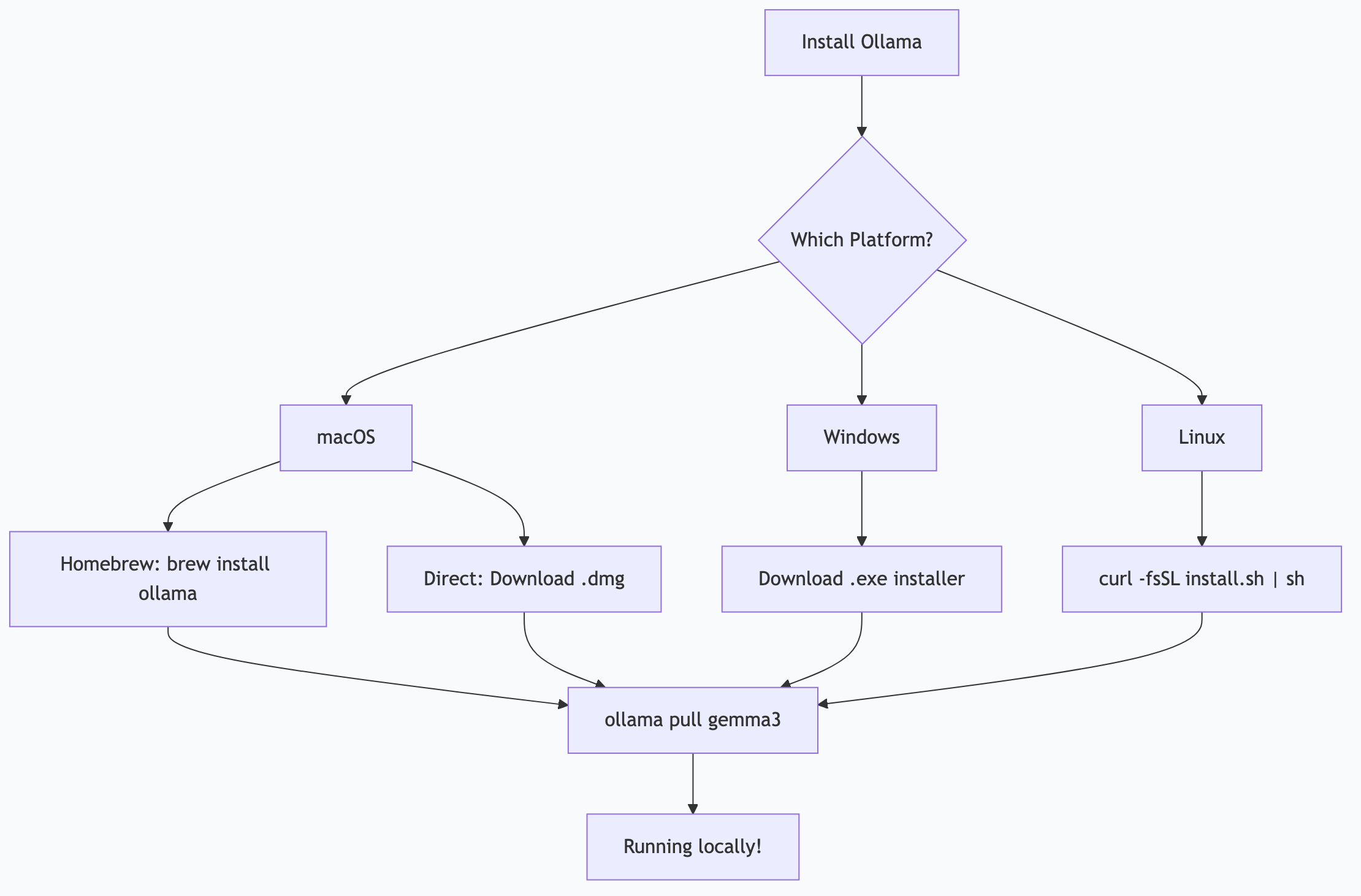
macOS
Option A: Direct download
- Go to ollama.com and download the macOS installer
- Open the
.dmgand drag Ollama to Applications - Launch Ollama — a menu bar icon appears
Option B: Homebrew
brew install ollama
ollama serve   # Start the server
Pull your first model:
ollama pull gemma3
ollama run gemma3
That’s it. You’re running a local AI.
Apple Silicon note: If you have an M1/M2/M3/M4 Mac, Ollama automatically uses Metal acceleration and unified memory. A MacBook Air with 16 GB can comfortably run 7-8B parameter models. A Mac Studio with 192-512 GB can run the largest open models available.
Windows
- Download the Windows installer from ollama.com
- Run the installer — Ollama installs as a Windows service
- Open PowerShell or Command Prompt:
ollama pull gemma3
ollama run gemma3
NVIDIA GPU: Detected automatically if CUDA drivers are installed. Check with nvidia-smi in a terminal. If your GPU shows up there, Ollama will use it.
No GPU? Ollama falls back to CPU. It works, but responses will be slower. Stick to smaller models (3-7B parameters) on CPU-only systems.
Linux
One-line install:
curl -fsSL https://ollama.com/install.sh | shThis installs Ollama and creates a systemd service that starts automatically.
ollama pull gemma3
ollama run gemma3
GPU setup:
- NVIDIA: Install CUDA drivers first (
nvidia-driver-xxxpackage), then install Ollama. It detects the GPU automatically. - AMD: ROCm support is available. Install ROCm drivers, then Ollama picks them up.
Headless/server: Ollama runs perfectly without a desktop environment. The API listens on localhost:11434 by default.
Choosing Your First Models
Don’t overthink this. Start with one general-purpose model and add specialized ones later.
| Model | Size | Good For | Memory Needed |
|---|---|---|---|
gemma3:4b | 2.8 GB | Quick tasks, low-memory systems | 8 GB RAM |
gemma3 (12b) | 8 GB | General purpose, good quality | 16 GB RAM |
gemma4:26b | 17 GB | High quality, complex reasoning | 32 GB RAM |
qwen3:8b | 5 GB | Coding, tool calling | 16 GB RAM |
qwen3-coder:32b | 20 GB | Serious coding tasks | 48 GB RAM |
llama3.3:70b | 43 GB | Maximum quality, research | 96+ GB RAM |
Rule of thumb: You need roughly 1.2x the model file size in available memory. If a model is 17 GB, you need at least 20 GB free.
# Pull a model
ollama pull gemma4:26b

# List installed models
ollama list

# Remove a model
ollama rm gemma3:4b
Configuration for Real Use
The defaults work fine for casual use. For daily automation or development, tune these settings.
Environment Variables
Set these in your shell profile (.zshrc, .bashrc) or systemd service file:
# Where models are stored (default: ~/.ollama/models)
export OLLAMA_MODELS="/path/to/models"

# Listen on all interfaces (for network access)
export OLLAMA_HOST="0.0.0.0:11434"

# Keep models in memory longer (default: 5m)
export OLLAMA_KEEP_ALIVE="24h"

# Max models loaded simultaneously
export OLLAMA_MAX_LOADED_MODELS=3

# GPU layers (0 = CPU only, -1 = all GPU)
export OLLAMA_NUM_GPU=-1
The API
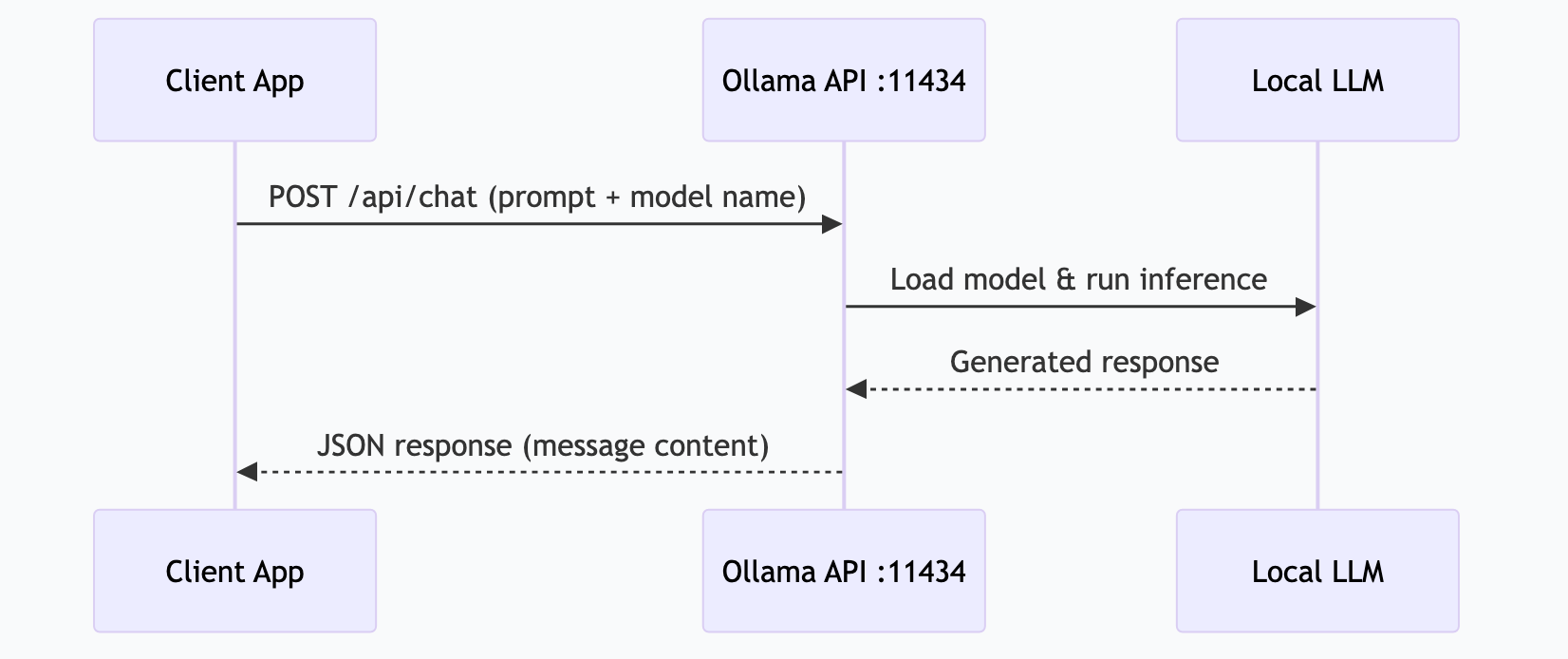
Ollama serves a REST API on localhost:11434. Every tool that supports Ollama — Claude Desktop, Open WebUI, Continue, LangChain — connects through this API.
# Quick test
curl http://localhost:11434/api/generate -d '{
  "model": "gemma4:26b",
  "prompt": "What is MCP?",
  "stream": false
}'

# Chat format (most common)
curl http://localhost:11434/api/chat -d '{
  "model": "gemma4:26b",
  "messages": [{"role": "user", "content": "What is MCP?"}],
  "stream": false
}'
Modelfiles (Custom Configurations)
Create a Modelfile to customize model behavior:
FROM gemma4:26b

PARAMETER temperature 0.3
PARAMETER num_ctx 8192

SYSTEM """You are a technical writing assistant. Write clearly and concisely. Use active voice. Avoid jargon unless the audience is technical."""
ollama create my-writer -f Modelfile
ollama run my-writerThis lets you create task-specific variants without downloading the same model multiple times.
How I Actually Do This
I run Ollama on a Mac Studio M3 Ultra with 256 GB of unified memory. Here’s what my production setup looks like:
Models Pinned in VRAM
I keep multiple models loaded permanently — no cold starts, instant responses:
# Keep models alive indefinitely
export OLLAMA_KEEP_ALIVE=-1
export OLLAMA_MAX_LOADED_MODELS=4| Model | Role | Why This One |
|---|---|---|
gemma4:e4b | Triage/routing | Fast, cheap, handles notification sorting and simple classification |
gemma4:26b | Daily workhorse | Balanced quality — handles 80% of tasks including research, drafting, analysis |
qwen3-coder:fast | Code tasks | Optimized for code generation, tool calling, structured output |
gemma4:31b | Heavy reasoning | Complex analysis, long documents, multi-step reasoning |
Automated Task Runner
OpenClaw (my local AI gateway) connects to Ollama’s API and runs 26 scheduled tasks:
- 6:00 AM — Research pipeline hits web sources, summarizes findings
- 6:15 AM — Log review scans overnight system logs for anomalies
- 6:30 AM — Morning briefing synthesizes calendar + priorities + news
- Every hour — Notification batching across all channels
Total cloud API cost: $0/month. Everything runs locally.
Performance Tuning
For Apple Silicon specifically:
- Set
num_gputo-1(all layers on GPU) — Apple’s unified memory means the GPU can access all 256 GB - Set
num_ctxbased on task — 4096 for quick tasks, 16384 for long documents, 32768 for code analysis - Monitor with
ollama psto see which models are loaded and how much memory they use
# Check what's running
ollama ps

# Example output:
# NAME              SIZE    PROCESSOR  UNTIL
# gemma4:26b        17 GB   100% GPU   Forever
# gemma4:e4b        3 GB    100% GPU   Forever
# qwen3-coder:fast  5 GB    100% GPU   Forever
Troubleshooting Common Issues
| Problem | Cause | Fix |
|---|---|---|
| Model runs slowly | Not enough GPU memory, layers on CPU | Check ollama ps — if PROCESSOR shows “CPU”, you need a smaller model or more memory |
| ”Out of memory” error | Model too large for your system | Try a smaller quantization (q4_0 instead of q8_0) or a smaller model |
| API connection refused | Ollama not running | Run ollama serve or start the desktop app |
| Model download stuck | Network issue | Ctrl+C and re-run ollama pull — it resumes from where it stopped |
| GPU not detected (Linux) | Missing CUDA/ROCm drivers | Install drivers first, then reinstall Ollama |
Frequently Asked Questions
Is Ollama free?
Yes, completely free and open source. The models are also free. There are no subscriptions, API fees, or usage limits.
Can I use Ollama with Claude Desktop?
Not directly — Claude Desktop uses cloud Claude. But you can connect Ollama to tools like Open WebUI, Continue (VS Code), or any application that supports the OpenAI-compatible API format. Many MCP servers can also route to local Ollama models.
How much disk space do models need?
Models range from 2 GB (small 3-4B models) to 45+ GB (large 70B models). Budget 5-20 GB for a typical setup with 2-3 models. Ollama stores them in ~/.ollama/models by default.
Can I run Ollama on a Raspberry Pi?
Technically yes, but practically no for anything useful. Even a Raspberry Pi 5 with 8 GB RAM can only run tiny models (1-3B) very slowly. A mini PC with 32 GB RAM is a much better entry point for local AI.
Does Ollama support tool calling / function calling?
Yes. Models like Qwen 3, Gemma 4, and Llama 3.3 support structured tool calling through Ollama’s API. This is essential for MCP server integration and agent automation.
This is part of the ASTGL Definitive Answers series — structured, practical answers to the questions people actually ask about AI automation, MCP servers, and local AI infrastructure.
Related Articles
Get the full Definitive Answers series
Practical answers to the questions people actually ask about AI automation, MCP servers, and local AI infrastructure.
Subscribe on Substack